
Install IntelQuest for Windows
Click the button below to download the installer. Then follow the five steps below to get past Windows' standard security warnings.
Why you'll see security warnings
This is normal for any new software.
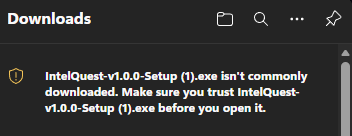
Your browser will show a warning in the downloads area that the file "isn't commonly downloaded." This is expected.
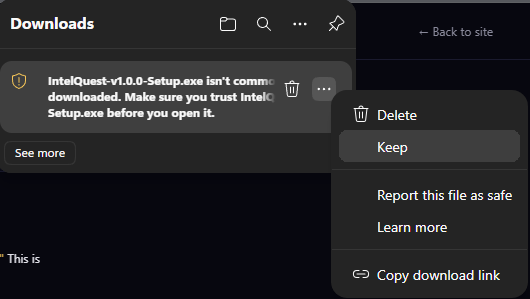
Click the ··· menu next to the warning, then select Keep.
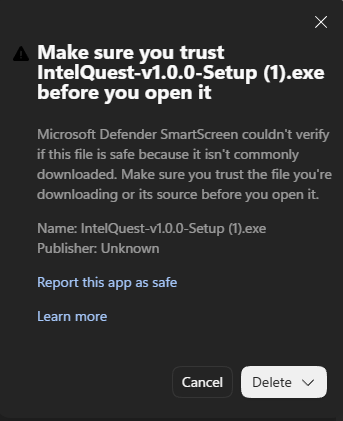
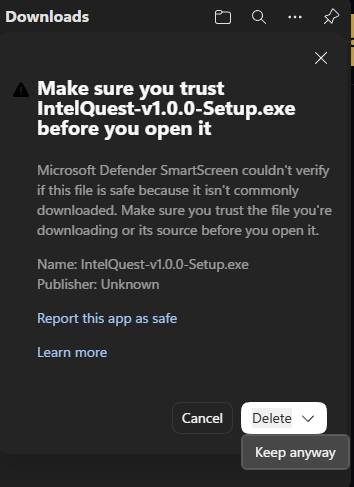
Your browser will ask you to confirm. Click the dropdown arrow next to Delete, then click Keep anyway.
Open the downloaded IntelQuest-v1.0.2-Setup.exe. The install wizard will launch.
The wizard will install IntelQuest to your local AppData folder — no admin install path, no shared system files. A shortcut will appear in your Start Menu under "IntelQuest."
When the wizard finishes, tick Launch IntelQuest if you want to start the app immediately. Click Finish.
When IntelQuest launches, Windows will show a prompt asking "Do you want to allow this app to make changes to your device?" Click Yes.
This prompt appears because IntelQuest reads live network data the same way Wireshark and other intelligence tools do. Windows shows the prompt every time you launch the app.
IntelQuest opens. Sign in with Discord. You're running.
That's it. Welcome to IntelQuest.
Subscribe to Pro from inside the app to unlock the live map and real-time spawn tracking. Combat tracking and zone bonuses are free forever.